
What Is a Cloud Migration Strategy, and Why Does It Matter?

Most companies don’t move to the cloud because it sounds modern. They move because something is hurting: servers are aging, costs keep climbing, releases are slow, or customers are outgrowing the infrastructure. The problem is that many teams start moving workloads before they’ve decided how, in what order, and why.
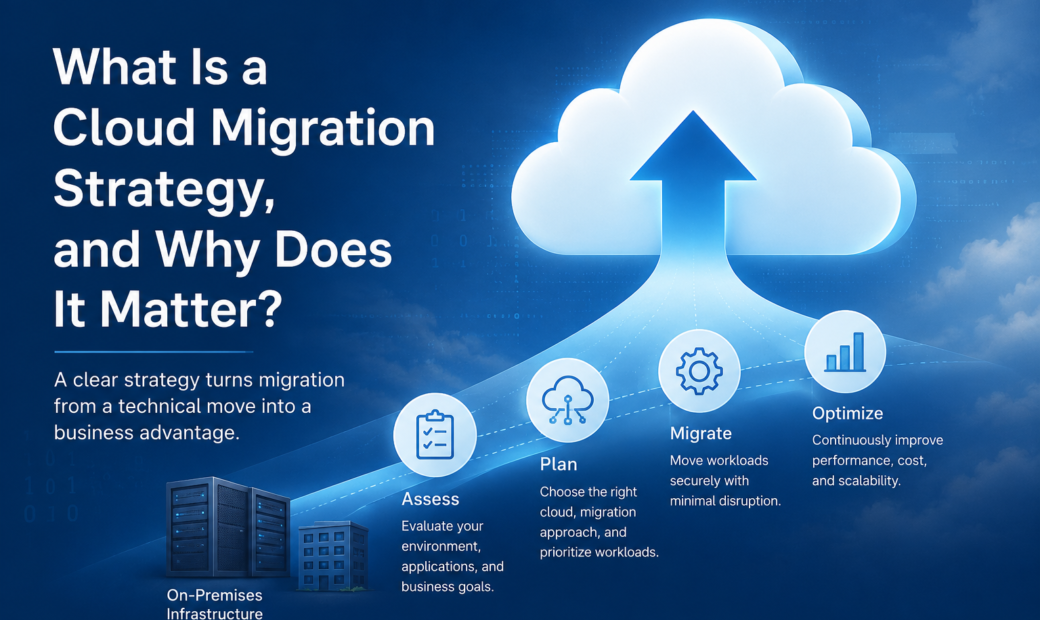
That’s where a cloud migration strategy comes in. It’s the plan that connects your business goals to the technical work of moving applications, data, and systems to the cloud. If you’re weighing the move and want an experienced second opinion, a cloud migration company like Bitrupt can help you assess what to move, what to fix first, and what to leave alone. Either way, the thinking below applies.
What Is a Cloud Migration Strategy?
A cloud migration strategy is a documented plan for moving your digital assets from on-premises servers (or another cloud) into a cloud environment such as AWS, Microsoft Azure, or Google Cloud.
It answers practical questions:
- Which applications and data should move, and which should stay?
- What is the best migration method for each workload?
- How will we protect security, compliance, and uptime during the move?
- What will it cost, and how will we measure success?
- Who owns each part of the work?
It is not the same as “lift everything to the cloud over the weekend.” A strategy is closer to a roadmap. It sets priorities, sequence, and guardrails.
Why a Cloud Migration Strategy Matters
Cloud projects rarely fail because the technology doesn’t work. They fail because of unclear goals, hidden dependencies, and costs nobody modeled. A solid strategy reduces those risks in four ways.
It ties the move to business outcomes
“Migrate to the cloud” is a task. “Cut infrastructure costs by a set percentage, or handle seasonal traffic without outages” is an outcome. When the goal is clear, every technical decision becomes easier to defend.
It prevents surprise costs
Cloud pricing is flexible, but it’s also easy to misjudge. Running two environments at once, paying data transfer fees, and leaving unused resources switched on all add up. A strategy forces you to estimate these before the invoice arrives.
It protects the business during the transition
Downtime, data loss, and compliance gaps are real risks, especially in finance, healthcare, and e-commerce. Planning the cutover, backups, and rollback options keeps customers from feeling the change.
It aligns teams
Migration touches engineering, security, finance, operations, and sometimes legal. Without a shared plan, each group works from different assumptions.
Real-World Examples
Three well-known cases show how different strategies lead to different results.
Netflix began moving to AWS after a major database corruption in 2008 disrupted its DVD shipping. It didn’t copy its data center into the cloud. It rebuilt its systems for the cloud over several years, finishing the move in 2016. That slower, deeper approach is why it can scale streaming globally.
Capital One committed to leaving its data centers and moving to AWS. For a regulated bank, the strategy included heavy investment in security controls and staff training, not just infrastructure.
Dropbox went the other way. After growing on AWS, it moved much of its storage onto its own infrastructure in 2016 and reported major savings. The lesson isn’t that the cloud is wrong. It’s that workload size, predictability, and cost should drive the decision.
The Main Cloud Migration Approaches
Most strategies use some mix of the following approaches, often called the “Rs” of migration.
- Rehost (lift and shift): Move the application as is. Fast and low-risk, but you don’t get many cloud benefits.
- Replatform: Make small changes, such as moving to a managed database, without redesigning the app.
- Refactor (re-architect): Rebuild parts of the application to use cloud-native features. Highest effort, highest long-term payoff.
- Repurchase: Replace the system with a SaaS product, such as moving a self-hosted CRM to a hosted one.
- Retire: Shut down applications nobody uses.
- Retain: Keep certain workloads where they are, for now.
A common mistake is choosing one method for everything. A good strategy matches the approach to each application’s value, age, and complexity.
Key Components of a Strong Strategy
1. Business case and goals
Define what success looks like: lower cost, faster releases, better resilience, easier compliance, or readiness for AI and analytics. Pick a few measurable targets.
2. Application and data assessment
Create an inventory. Map dependencies, data volumes, performance needs, and licensing terms. Old systems often have hidden connections that only appear when something breaks.
3. Cloud model and provider selection
Decide between public, private, hybrid, or multi-cloud. Evaluate providers on pricing, regional availability, compliance certifications, and how well they fit your existing tools. Think about vendor lock-in before you commit.
4. Security and compliance planning
Define identity and access rules, encryption, logging, and data residency. Cloud providers secure the infrastructure, but you remain responsible for your configurations and data.
5. Migration roadmap
Start with lower-risk workloads to build confidence, then move critical systems in phases. Include testing, cutover windows, and rollback plans.
6. Governance and cost management
Set budgets, tagging rules, and monitoring from day one. This is often called FinOps, and it keeps cloud spending predictable.
7. People and skills
Your team may need training, or outside support. Plan for this early, since skill gaps slow more projects than technology does.
Costs to Plan For
Cloud migration costs go beyond the monthly hosting bill. Budget for:
- Assessment and planning
- Migration tooling and engineering time
- Application changes (refactoring or replatforming)
- Parallel running of old and new environments
- Data transfer and storage
- Security tools and compliance audits
- Training and change management
- Ongoing optimization
Savings often arrive later than expected. Many companies see the real payoff after they’ve optimized resources, not on migration day.
Common Risks and How to Reduce Them
| Risk | How to reduce it |
|---|---|
| Unexpected downtime | Phased cutovers, load testing, rollback plans |
| Cost overruns | Early cost modeling, budgets, usage alerts |
| Security gaps | Least-privilege access, encryption, regular audits |
| Hidden dependencies | Thorough discovery before moving anything |
| Vendor lock-in | Open standards, containers, clear exit options |
| Team resistance | Early communication and hands-on training |
Best Practices That Hold Up
- Start with a pilot. Move one low-risk application first and learn from it.
- Clean up before you move. Don’t pay to migrate systems you could retire.
- Automate where you can. Infrastructure as code reduces human error and makes environments repeatable.
- Test before and after. Validate performance, security, and data integrity at each stage.
- Measure continuously. Track cost, speed, uptime, and user experience against your original goals.
- Treat migration as the start. Optimization, monitoring, and modernization continue after go-live.
When to Get Outside Help
If your team has never run a migration, or your systems are old, complex, or heavily regulated, outside experience can save months of trial and error. Look for a partner who starts with your business goals, shows how they’ve handled similar projects, and is honest about trade-offs, including when staying put is the better call.
Conclusion
A cloud migration strategy is what turns a risky technical project into a controlled business decision. It clarifies why you’re moving, what to move first, how to protect operations, and how to keep costs in check. The companies that get the most from the cloud aren’t the ones that move fastest. They’re the ones that plan carefully, move in stages, and keep improving afterward.
Frequently Asked Questions
1. How long does a cloud migration take?
It depends on scope. A small application can move in a few weeks. A large enterprise environment can take 12 to 36 months. Phased migrations are common because they limit risk.
2. How much does cloud migration cost?
Costs vary widely based on the number of applications, data volume, and how much re-engineering is needed. Lift-and-shift is cheaper upfront, while refactoring costs more but often saves more over time. A detailed assessment is the only reliable way to get a number.
3. Is lift and shift a good strategy?
It works well when you need speed, such as a data center exit deadline. The trade-off is that you may not reduce costs or gain cloud-native benefits until you optimize later.
4. What is the difference between cloud migration and digital transformation?
Cloud migration is moving systems to the cloud. Digital transformation is broader. It includes changing processes, products, and ways of working, often using the cloud as a foundation.
5. Should we choose a single cloud or multi-cloud?
A single provider is simpler and easier to manage. Multi-cloud can reduce lock-in and improve resilience, but it adds complexity and cost. Most small and mid-sized businesses do well starting with one.